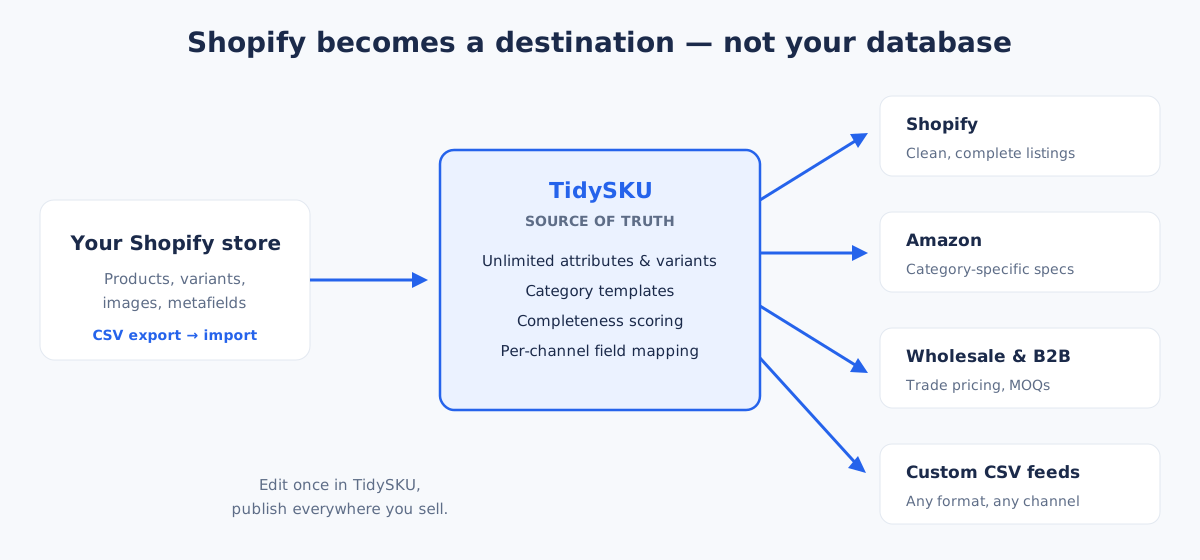
If you're selling on Shopify and one or more other channels — Amazon, wholesale, your own B2B portal — you're already maintaining product data in too many places. TidySKU sits above Shopify as the source of truth, syncing product data everywhere you sell.
Shopify is a great storefront. As a master product data system — the place every other channel pulls from — it runs out of road quickly:
A PIM solves this by making Shopify one of several destinations for your product data, not the source. You manage product data in one place, then publish to Shopify, Amazon, your B2B portal, and any feed format you need — all from the same record.
Metafields are clunky at scale. Defining and managing dozens of product attributes quickly becomes painful.
You can't see which products are missing data. Incomplete listings go live without anyone noticing.
Shopify manages Shopify only. If you sell on Amazon, wholesale, or anywhere else, you're on your own.
Up to 100 variants and three option types. Complex products quickly hit the ceiling.
Broad permissions with no granular tracking. You can't control who edits what or see who changed something.
Not sure if you've outgrown Shopify's built-in tools? Take our quick assessment to find out.
A PIM doesn't replace Shopify — it works alongside it. Here's the workflow:
Bring your existing catalogue into the PIM. Products, variants, images, and metadata all come across.
Add attributes, organise categories, fill in gaps, and track completeness. Build the product data Shopify can't hold.
Map PIM data to Shopify's format and export. Your store gets clean, complete product listings.
The same data goes to Amazon, wholesale, and any other channel — each with its own format mapping.
The fastest way to see if a PIM fits your workflow is to actually load your products into one. Here's exactly how that works with TidySKU and a Shopify store:
From Shopify Admin → Products → Export. Select all products. Shopify emails you a CSV in 1–2 minutes (longer for large catalogues).
In TidySKU, choose Import → Shopify CSV. Column mapping is auto-suggested for the standard Shopify export — titles, handles, descriptions, prices, variants, images, and metafields all flow into matching TidySKU fields. Confirm the mapping and import.
Within seconds of import, every product, variant, image, and attribute is visible as a structured catalogue. Run a completeness scan and TidySKU shows you which products are missing required attributes — the gaps Shopify can't surface.
From there, you can enrich the data, add attributes Shopify doesn't support natively, and export channel-specific feeds for Amazon, wholesale, or any other destination — all without touching the Shopify admin.
| Shopify metafields | TidySKU | |
|---|---|---|
| Custom attributes per category | Manual, one definition at a time | Category templates, reusable across products |
| Required-field enforcement | Not supported | Built-in completeness scoring |
| Bulk editing | App-dependent, often paid | Spreadsheet-style bulk edit on every plan |
| Multi-channel feeds | Shopify only | Shopify, Amazon, wholesale, custom CSV |
| Variants | Capped at 100 × 3 options | Unlimited variant attributes |
| Audit trail | Limited to Shopify Plus | Included on every plan |
If that sounds familiar, you're exactly who a small business PIM is built for. See how PIM pricing works to understand your options.
No. Shopify remains your storefront. TidySKU manages product data and feeds it into Shopify (and other channels). Think of it as the backstage system that keeps your product information organised before it reaches any sales channel.
Currently TidySKU supports export to Shopify-compatible formats. Direct two-way sync is on the roadmap. For now, you export from TidySKU and import into Shopify when your data is ready.
No. Import via CSV, map attributes, and you're running. No code needed. If you can use a spreadsheet, you can use TidySKU.
A PIM still helps with large catalogues — completeness tracking, bulk editing, and structured data are valuable even with one channel. But the biggest ROI comes when you sell across multiple channels.
TidySKU supports variants natively. Define variant attributes, manage them in bulk, and export in Shopify's format. No more hitting Shopify's 100-variant or three-option-type limits.
Start free with 50 products. No credit card required.
Create your free account