If you've been researching product data tools, you've hit a wall of acronyms. Here's what each one actually does, how they relate, and which one you probably need.
What it does: A PIM centralises, structures, enriches, and distributes product data. It's the single source of truth for everything about your products — titles, descriptions, attributes, specs, images, pricing, and channel-specific information.
Who it's for: Any business that sells products and needs to manage product data across teams, tools, or sales channels. From a 200-product DTC brand to a 50,000-SKU wholesaler, PIM is the starting point for getting product data under control.
Core capabilities:
Learn more: What is a PIM?
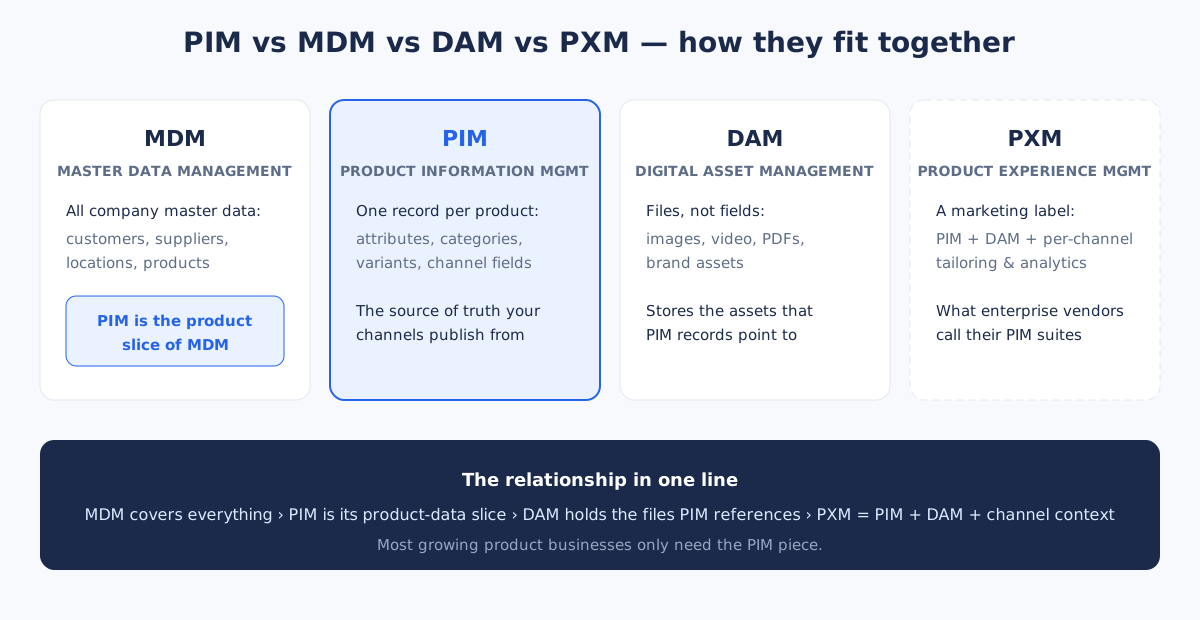
What it does: MDM manages all critical business data — not just products, but customers, suppliers, employees, locations, and financial records. It's the broadest system in this comparison, creating a unified view of an organisation's core data entities.
Who it's for: Large enterprises with complex data landscapes where inconsistency across systems causes real business problems. Think global manufacturers, financial institutions, or healthcare organisations where data governance is a regulatory requirement.
How it relates to PIM: PIM is a subset of MDM. MDM encompasses product data alongside every other type of master data. Most businesses don't need full MDM — they need a PIM to solve their product data problems and potentially separate systems for customer or supplier data.
See also: MDM in the glossary
What it does: A DAM stores, organises, tags, and distributes digital files — images, videos, PDFs, design files, and other media. It manages the lifecycle of assets from creation through approval to distribution.
Who it's for: Businesses with large volumes of digital assets that need version control, rights management, format conversion, and organised distribution. Common in media companies, agencies, and brands with extensive visual content.
How it relates to PIM: Product images and documents are one use case for DAM, but DAM isn't limited to product data. In practice, a PIM often handles basic asset management (attaching images to products), while a dedicated DAM manages the broader media library. The two complement each other — the DAM is the asset source, and the PIM references those assets in the product context.
See also: DAM in the glossary
What it does: PXM extends PIM with audience-specific content, localisation, personalisation, and channel optimisation. It focuses on how products are presented to different audiences in different contexts — not just what the data is, but how it's experienced.
Who it's for: Large brands selling across many markets, languages, and channels where the same product needs fundamentally different presentation depending on the audience. Salsify positions itself as a PXM platform.
How it relates to PIM: PXM is an extension of PIM, not a replacement. It adds a layer of experience management on top of centralised product data. For most businesses, a good PIM with multi-channel export handles their content differentiation needs without the added complexity of PXM.
See also: PXM in the glossary
These four systems sit at different levels of scope:
Manages all master data across the entire organisation. PIM sits within MDM as the product data component.
Manages product data specifically. The foundation that DAM feeds into and PXM builds upon.
Manages digital assets that feed into product records. Works alongside PIM, not as a replacement.
Extends PIM with an experience layer — audience targeting, localisation, and channel optimisation.
The practical takeaway: most businesses need a PIM first. Everything else is either a complement (DAM), an extension (PXM), or something you probably don't need yet (MDM).
| You need this if… | PIM | DAM | MDM | PXM |
|---|---|---|---|---|
| Product data is scattered across spreadsheets and platforms | Yes | No | No | No |
| You sell on multiple channels and need consistent data | Yes | No | No | Maybe |
| You manage thousands of images, videos, and design files | No | Yes | No | No |
| You need to unify customer, supplier, and product data | No | No | Yes | No |
| You sell the same product differently in 10+ markets | Maybe | No | No | Yes |
| You need product data completeness and quality tracking | Yes | No | No | Yes |
| Your team needs to collaborate on product content | Yes | Maybe | No | Yes |
For most businesses reading this, the answer is PIM. It solves the most common product data problems, and you can add complementary tools later if your needs grow.
TidySKU gives you everything you need from a PIM without the complexity of enterprise platforms. Centralise your product data, track completeness, and export to any channel. Free for up to 50 products.
For basic asset management — attaching product images, storing a few PDFs — yes, most PIMs handle that fine. But if your business deals with thousands of media assets, needs complex rights management, or runs large-scale creative production workflows, you'll want a dedicated DAM alongside your PIM.
Not quite. PXM adds genuine capabilities around channel-specific content optimisation, localisation, and personalised product experiences. But for most businesses, a solid PIM covers what they actually need. PXM becomes relevant when you're operating at scale across many markets and audiences.
No. PIM can be implemented independently of any broader MDM initiative. Most businesses start with PIM to solve their product data problems and never need full MDM. If your organisation later decides to unify all master data, your PIM data feeds naturally into that.
Yes. In larger organisations, it's common to see a PIM managing product data, a DAM managing media assets, and the two connected via integrations. But you don't need all of them to get started. Start with the system that solves your most pressing problem — usually PIM.
Free for up to 50 products. No credit card required.
Create your free account